Overview
Welcome to Shortcut! This guide explains how Shortcut concepts map to Jira. When you are ready to move your data, choose a one-time Import from Jira or use Jira Sync while your team continues working in Jira.
Import from Jira
Shortcut’s Jira importer brings your Jira projects, issues, history, and users into Shortcut.
Before you begin:
- Confirm that you have Admin access in both Jira and Shortcut.
- Decide which Jira projects you want to import.
- Review how Jira workflows should map to Shortcut Workflows.
Jira Epics are imported as Shortcut Epics. Jira Subtasks are imported as Shortcut Stories with a dependency on the parent Story.
Start the import from Settings > Import / Sync and follow the mapping steps in Shortcut.
After the import, review the created Labels and use bulk editing to update imported Stories. You can roll back an import from the Past Imports tab. Running the same import again creates duplicate Stories, so roll back and re-import when you need a clean second attempt.
Jira Sync
Jira Sync is useful when a team wants to evaluate Shortcut while continuing to work in an existing Jira project. When enabled:
- New Shortcut Stories create Jira Issues.
- New Jira Issues create Shortcut Stories.
- Story titles and descriptions sync in both directions.
- Shortcut Workflow State changes update Jira.
Workflow State changes made in Jira do not sync back to Shortcut, and most metadata changes after creation are not synchronized.
Set up Jira Sync
- Import and map the Jira project using Settings > Import / Sync.
- During the final import step, enable Jira Sync and select the Shortcut Team for newly synced Stories.
- If the Jira project was already imported, return to Settings > Import / Sync and select Set Up Jira Sync.
- Map the Jira project to a Shortcut Workflow.
Only one Jira Sync can be active in a Workspace at a time.
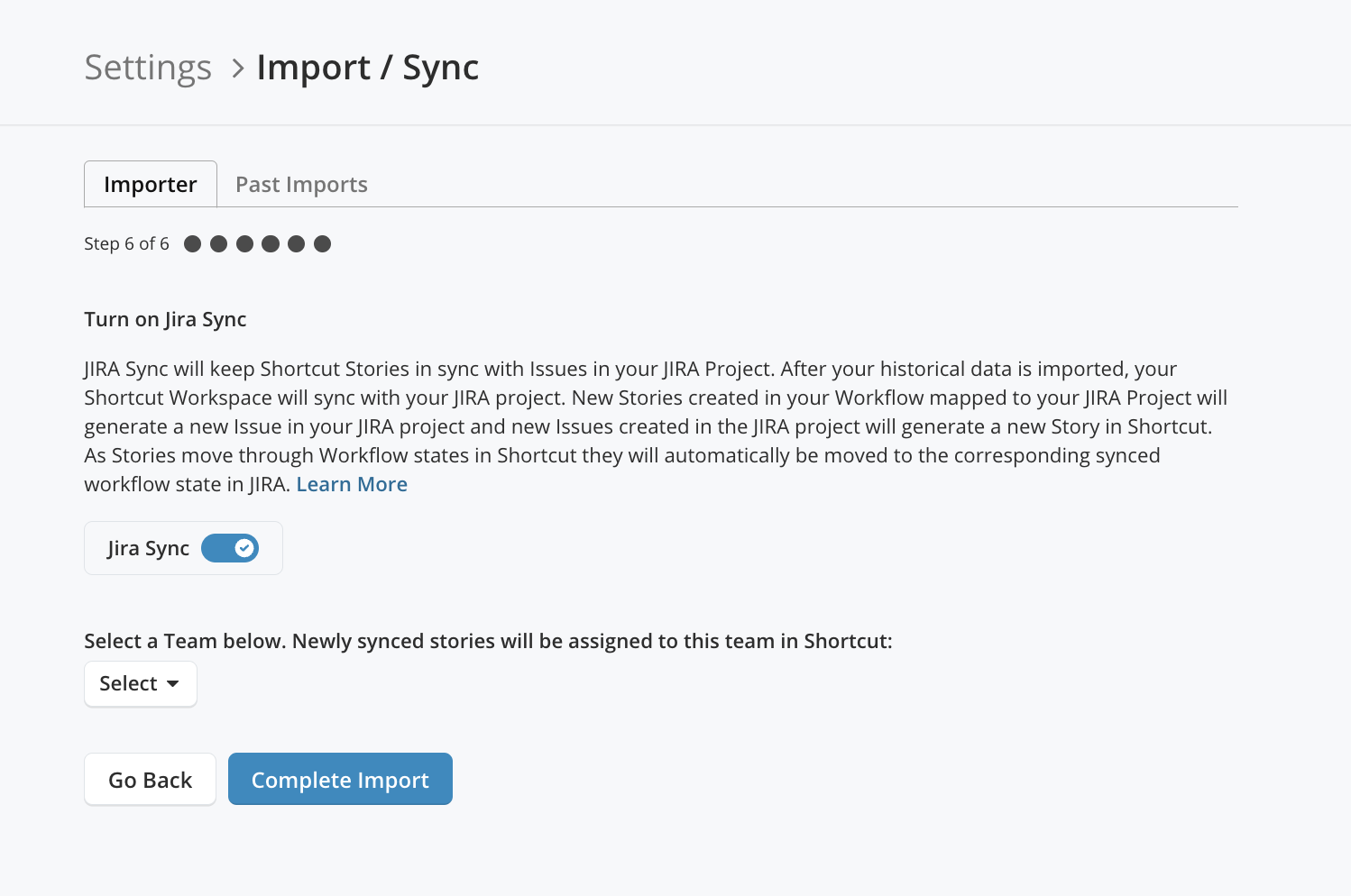
After setup, Shortcut shows the live connection in Settings > Import / Sync, where an Admin can also disable it.
Stories vs. Jira Issues
| Shortcut | Jira | Description |
|---|---|---|
| Story | Issue | Individual piece of work in a Workflow |
| Types: Bug, Feature, Chore | Types: Bug, Story, Epic, Custom | Story type defined in the “type” field |
| Requester | Reporter | User requesting the work |
| Owner | Assignee | User completing the work |
| Follower | Watcher | User following the Story |
| Estimate Field | Story Points | Points for planning work |
Best Practice: A Story should be 1-2 days of work (no longer than a week or two). Break larger work into multiple Stories using Story relationships.
Sub-tasks vs. Jira Tasks
Sub-tasks break down Stories into smaller pieces. Like Stories, you can estimate Sub-tasks, connect them to VCS, and move them through your Workflow.
Epics vs. Jira Epics/Projects
An Epic is a collection of Stories representing a larger feature or initiative.
Key difference: In Shortcut, Epics can span multiple Workflows and Teams. In Jira, Epics are confined to a Project.
Objectives vs. Jira Initiatives
Objectives are the highest level of hierarchy—collections of Epics representing company goals with the biggest business impact.
Teams vs. Jira Teams
Teams represent cross-functional squads who collectively own Stories, Epics, and Iterations. Teams are easily filterable and can be added/removed from any entity.
Iterations vs. Jira Sprints
Iterations are time-boxed periods for sprint tracking. The Iteration page includes Burndown charts, Cycle Time/Lead Time charts, and Cumulative Flow Diagrams.
Spaces vs. Jira Boards
Spaces are filtered views of the Stories page. Create saved Spaces for your team, current Iteration, or any custom view—no need for siloed “Boards.”
Workflows vs. Jira Workflows
Workflows define the states Stories move through. Shortcut Workflows are simpler than Jira—no complicated “Workflow Designer” needed.
- Workflows and Teams have a many-to-many relationship
- All Teams can share Workflows, or each can have custom ones
- Different Story types don’t require different Workflows
Docs vs. Confluence
Docs is built into Shortcut—no separate tool needed. Create and link Stories, Epics, and Iterations directly from Docs.